
Bitnami Magento 2 “Invalid Form Key. Please refresh the page”

Sometimes when you create a product with multiple attributes in Magento 2, you may end up with the error message “Invalid Form Key. Please refresh the page.”
To get rid of this message, you need to increase the value of max_input_vars in php.ini file. By default, this value is set to 1000. You should set it to 5000 or 10000.
Bitnami magento is easy to fixed that issue.
Open ftp, and find apps of magento in bitnami, go to config folder, and open php-settings.conf, add a new record php_value[max_input_vars]=8000
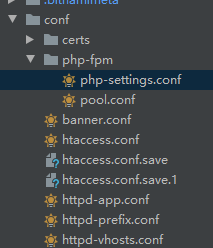
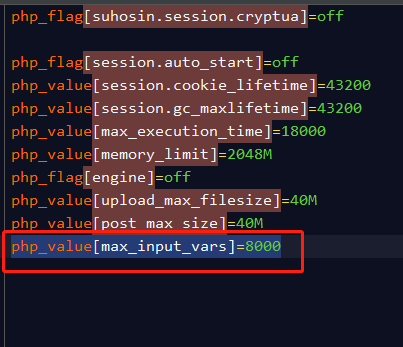
And upload the code. After finish that, you can restart php-fpm, and it will be working.
sudo /opt/bitnami/ctlscript.sh restart php-fpm
标签
热门文章
- 1 Magento ver. 2.2.0-dev - A technical prob... 16810
- 2 ECS git pull 代码很慢的问题 14918
- 3 玩客云监工客户端 13395
- 4 Magento 2 UI Form Validation 13331
- 5 Codeigniter SSL 强制重定向至https访问 13196
- 6 magento2 完整卸载模块的正确姿势 12838
- 7 Magento fix 500 12478
- 8 Magento index is locked by another reinde... 10943
- 9 Ubuntu删除日志文件 9207
- 10 Magento 2安装ElasticSearch 6.x搜索引擎-Ub... 8808
微信公众号
